How to send periodic CAN messages with a script
tip
This is useful for sending a variable to the CAN, if the variable is not present in the CAN protocol.
The send command transmits a single message. To send messages periodically, wrap send in a script loop built from the branch command and a delay.
This example periodically broadcasts two CAN frames every 200 ms:
- CAN ID
0x700— a scaled command and a mode:- bytes
0-1:/driver/cmdasint16(a float in range-1 .. 1scaled to the fullINT16_MIN .. INT16_MAXrange) - byte
2:/driver/modeasuint8
- bytes
- CAN ID
0x701— two GPIO values read live from the device:- bytes
0-1:/common/gpio0asuint16 - bytes
2-3:/common/gpio1asuint16
- bytes
The script
# --- one-time setup: create the variables ---
var cmd_scaled float
var raw int16          # scaled command (INT16_MIN .. INT16_MAX)

var msg700.3 uint8     # frame 0x700: int16 cmd + uint8 mode = 3 bytes
var msg701.2 uint16    # frame 0x701: gpio0 + gpio1 = 4 bytes


# --- periodic loop, detached to keep the shell usable ---
{
    # scale the float command (-1 .. 1) to the full int16 range
    set cmd_scaled /driver/cmd*32767
    set raw cmd_scaled

    # pack frame 0x700: bytes 0-1 = int16 cmd (LSB first), byte 2 = mode
    set msg700.0 raw
    set raw raw:256
    set msg700.1 raw
    set msg700.2 /driver/mode

    # pack frame 0x701: read the two GPIO inputs from the device
    set msg701.0 /common/gpio0
    set msg701.1 /common/gpio1

    # transmit both frames over the first CAN interface (interface 3)
    send -i3 -f1 -s0x700 msg700
    send -i3 -f1 -s0x701 msg701

    delay 200
    branch s
}
note
- Interface
3is the first CAN bus. See the Interface IDs table for other interfaces. - Flag
-f1selects the broadcast datagram so that-s0x700is used directly as the CAN ID. See What CAN IDs are occupied? before choosing an ID. - Change the period by editing the
delayvalue (in milliseconds).
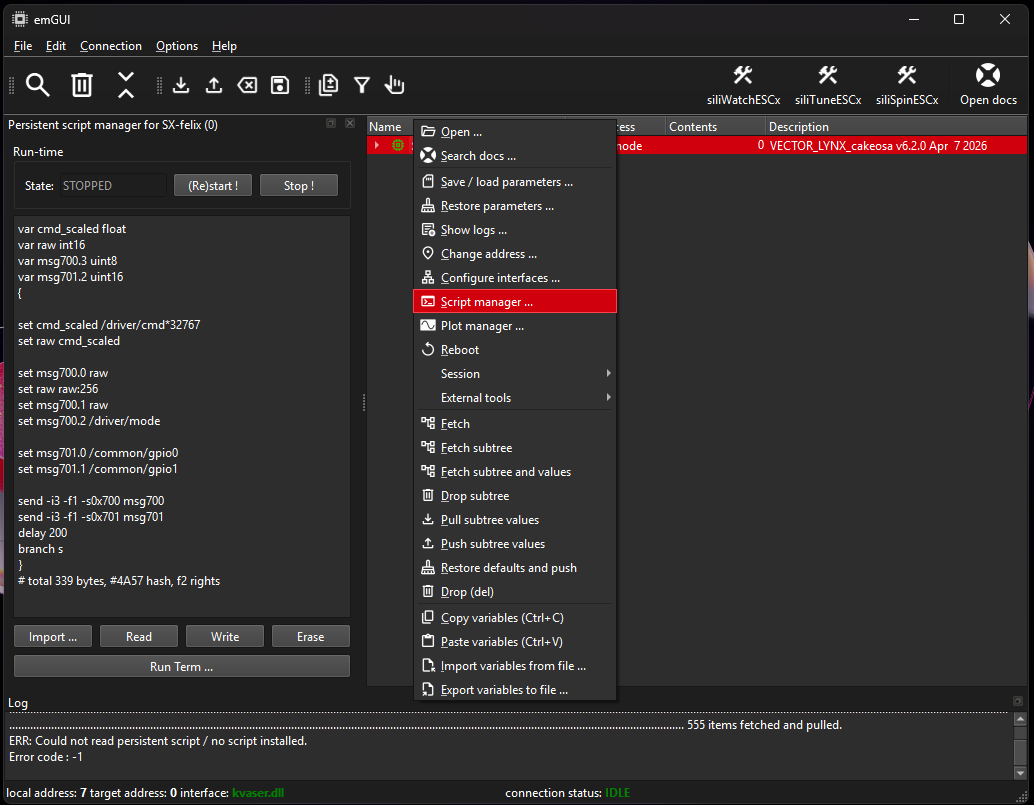
Persistent script
Use a "script manager" in the emGUI to store the script persistently on the device. The script will then run automatically after a power cycle.