Vehicle Speed Calculation
Lynx provides two methods for calculating vehicle speed.
When using a Bafang display, the system only sends wheel revolution data to the display. The display's settings (wheel diameter, units) handle the conversion from wheel revolutions to speed.
Motor Speed
Speed can be determined using information from the driver without installing external sensors. This method requires correct drive train parameter settings (motor pole pairs - driver/motor/pp, gear ratio - /gearthr, and wheel size - /odothr).
/gearthr: Value represents motor shaft revolutions per wheel revolution/odothr: Value represents number of wheel revolutions per kilometer
Once these parameters are set correctly, you can set speed limitations in km/h. The current speed reading is available in the /speed state.
If /gearthr and /odothr remain at default values, speed readings will be in [motor RPM]. Consequently, the speed limit kph in maps will also be in [motor RPM].
This method doesn't work with motors using a freewheel clutch. In such cases, an external speed sensor is required.
Speed Limiter Response Tuning
Proper parameter tuning is essential to prevent oscillation or slow response.
If oscillation occurs, try reducing the rdec parameter to slow limiter response, or increase rdec for faster response.
Here are recommended starting values for tuning:
"/driver/limiter/rdec" : "100.0" # '[RPM] speed limiter decrement rate'
"/driver/limiter/rgain" : "100.0" # 'speed limiter gain'
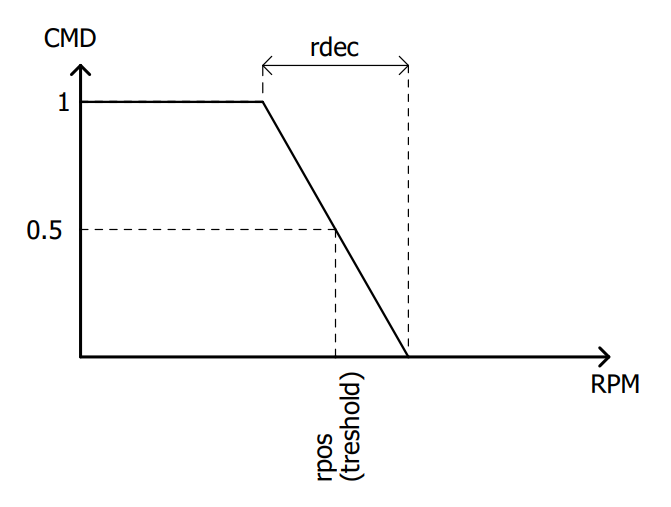
The rpos treshold is calculated from the map speed limit kph.
The rpos, rdec are in [motor RPM], while kph in maps is in [kph] of the vehicle.
External speed sensor
Vehicle speed can be calculated using pulses from an external speed sensor. Configure settings in the Tachospeed block (which outputs wheel rotation speed). Final vehicle speed is calculated using the wheel size information (odothr).
The external speed sensor becomes active when in_speed is mapped to a valid physical input
Settings for external speed sensors (such as pulses per revolution) are found in the /tachospd folder. More about tacho block
By default, speed is limited based on motor speed readings. To use the external speed sensor for speed limitation, adjust the speedopts parameter.
speedopts
This parameter is located in the root (
/) folder.
| Value | Name | Description |
|---|---|---|
| 1 | External speed limiter | Enables additional speed limiter from external sensor. Speed input will be used from motor and from the external speed sensor, for redundancy. |
| 2 | Global speed limiter only | Set additional speed sensor only to global speed limiter (kphlimit) |
| 4 | Speed fusion | Uses the maximum of motor speed and external sensor speed. Ensures speed is never underestimated for limiting purposes. |
| 8 | Allow negative speed | Allows showing negative speed values |
| 128 | Disable motor speed limiter | Disables primary speed limiter (from motor) |
rdec and rgain parameters also apply to the external speed sensor. Use these to adjust the speed limiter response.