Temperature limitation
The BMS has implemented temperature limitations for the battery and the BMS itself.
- Before continuing, make sure, that all temperature sensor readings are correct and configured.
- All mentioned variables are located in folder
/driver/temp/.
More about protection and limitation
Protection
The BMS ports are turned off when any temperature sensor reading is above its max value (or under min). To turn the ports back on, the temperature must be below the max value and the user must switch back on the BMS.
If the ports are turned off due to the temperature limitation, the BMS will enter PROTECT state and log the reason into protectLog:
- Value 0x0400 (Overtemp on TS inputs) - a battery TS input crossed
max - marginMaxormin + marginMin - Value 0x0200 (Overtemp of the switch) - an internal switch sensor (
switchptc,mcu) crossed itsmaxthreshold
If a balancer sensor (balmcu, ptcBal) is overtemperature, the ports stay on - only balancing is paused (balState bit 2).
Limitation
For each temperature sensor, you can configure the limitation. For the build-in temperature sensors, you can not configure the max parameter.
When the sensor reading enters the dec zone, the available current is linearly reduced (see how the limiter works) and the corresponding bit is set in the limit word - bit 1 for internal BMS sensors, bits 2 and 4 for battery TS inputs.
| Parameter | Description |
|---|---|
max | Maximum temperature for the sensor. If the sensor reading is above this value BMS enter PROTECT state. |
marginMax | Area with no power. |
decMax | Area with reduced power. |
marginMin | Area with no power. |
decMin | Area with reduced power. |
min | Minimum temperature for the sensor. If the sensor reading is below this value BMS enter PROTECT state. |
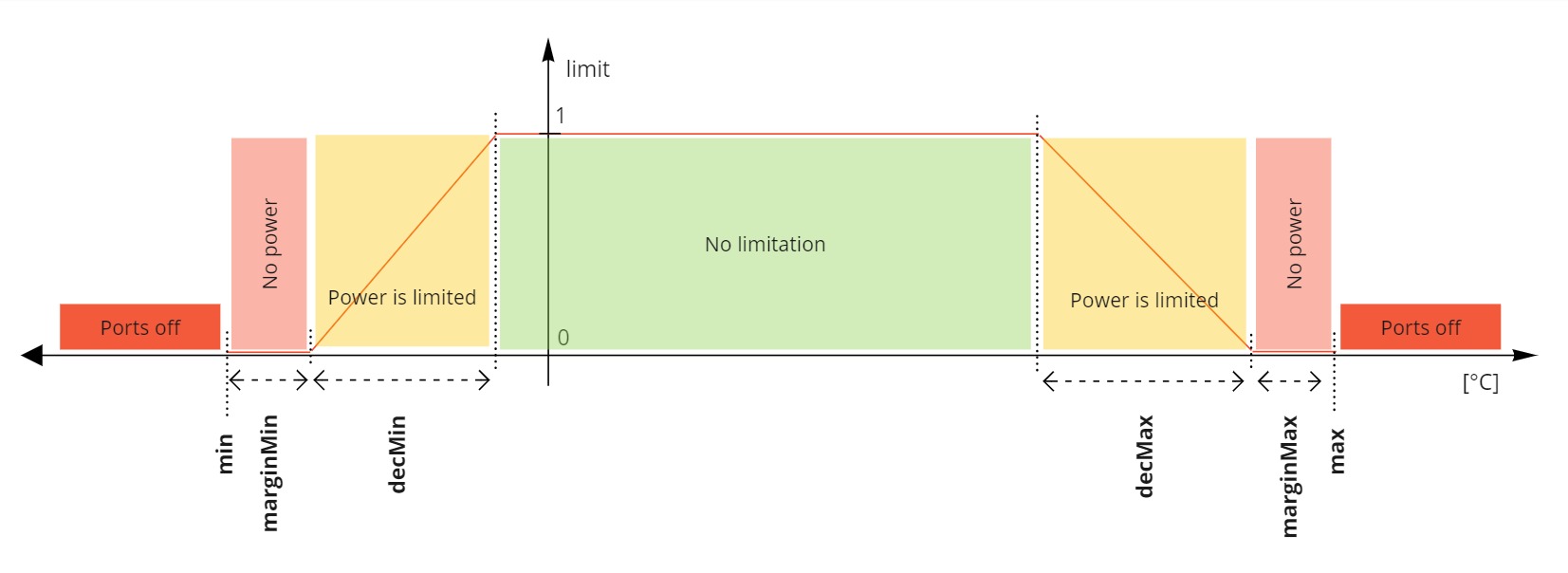
- First, configure the
maxparameter, after that tune the limitation parameters - The limitation can be configured even for sensors with ohm reading. Only the limitation parameters will be in ohms too.
Battery TS input min/max limits apply to discharging (DSC port). The limits for charging are configured separately - see below.
Charging temperature limits
Battery cells usually have a much narrower allowed temperature range for charging than for discharging. Each battery TS input therefore has a second, independent set of limits that applies only to the charge direction (CHG port and regen).
| Parameter | Description |
|---|---|
maxChg | Maximum battery temperature for charging. |
marginMaxChg | Area below maxChg with no charging power. Sets limit bit 2048. |
decMaxChg | Area with linearly reduced charging power. Sets limit bit 2048. |
marginMinChg | Area above minChg with no charging power. Sets limit bit 1024. |
decMinChg | Area with linearly reduced charging power. Sets limit bit 1024. |
minChg | Minimum battery temperature for charging. |
When a charger is connected and any battery TS input reading is above maxChg - marginMaxChg or below minChg + marginMinChg, the BMS enters the CHG_OVERTEMP state - the CHG port is blocked, but the DSC port stays available. The BMS does not enter PROTECT in this case, and charging resumes automatically once the battery temperature returns into the allowed range.