Pinout and I/O specification
Board pin list
The AM controller board has 30 signal pins, plus power terminals for battery and motor phases.


| Pin | Name | Description | Direction |
|---|---|---|---|
| 1 | USB+5V | USB 5 V | Power input |
| 2 | USBGND | USB ground, internally connected to BATT- | Power input |
| 3 | USBDM | USB data - | I/O |
| 4 | USBDP | USB data + | I/O |
| 5 | KEY | Internally connected to BATT+ | Power output |
| 6 | VBATSW | Internally connected to BATT+ when controller is ON | Power output |
| 7 | GND | Internally connected to BATT- | Power output |
| 8 | POWER | Controller ON/OFF input, active high | Input |
| 9 | DOUT2 | Generic digital output | Output |
| 10 | DOUT1 | Generic digital output | Output |
| 11 | HALLGND | Hall sensors supply ground | Power output |
| 12 | HALLW | Hall sensor W | I/O |
| 13 | HALLU | Hall sensor U | I/O |
| 14 | HALLV | Hall sensor V | I/O |
| 15 | HALL+5V | Hall sensors supply voltage | Power output |
| 16 | CANL | CAN Bus LOW | I/O |
| 17 | CANH | CAN Bus HIGH | I/O |
| 18 | CANGND | CAN Bus ground | Power output |
| 19 | AGND | Analog supply ground | Power output |
| 20 | GPIO1 | Analog input 1 | Input |
| 21 | GPIO0 | Analog input 2 | Input |
| 22 | AVCC | Analog supply voltage | Power output |
| 23 | DIN1+ | Digital input 1 + | Input |
| 24 | DIN1- | Digital input 1 - | Input |
| 25 | DIN2+ | Digital input 2 + | Input |
| 26 | DIN2- | Digital input 2 - | Input |
| 27 | COMRXD | UART RX | Input |
| 28 | COMTXD | UART TX | Output |
| 29 | COMGND | UART ground | Power output |
| 30 | COM+10V | UART supply 10 V | Power output |
| BATT+ | Battery / power source input + | Power input | |
| BATT- | Battery / power source input - | Power input | |
| A | Motor phase A | Power output | |
| B | Motor phase B | Power output | |
| C | Motor phase C | Power output |
Power connectors pinout
Amass XT60, MT60 (variant A)
Battery is connected via Amass XT60 male connector. Motor phases are connected via Amass MT60 female connector.


Signal connector pinouts (JST JWPF, variant J)
USB connector

JST JWPF 4-pin male (JM4_USB)
| Pin | Name | Wire colour | Function |
|---|---|---|---|
| 1 | USBDP | White | USB data+ |
| 2 | USBDM | Green | USB data- |
| 3 | USBGND | Black | USB ground |
| 4 | USB+5V | Red | USB 5 V supply |
Power connector

JST JWPF 3-pin female (JF3_PWR)
| Pin | Name | Wire colour | Function |
|---|---|---|---|
| 1 | KEY | Brown | Supply in/out |
| 2 | POWER | Yellow | Power control input |
| 3 | GND | Black | Ground |
Digital OUT1 connector

JST JWPF 2-pin female (JF2_DO1)
| Pin | Name | Wire colour | Function |
|---|---|---|---|
| 1 | VBATSW | Brown | Switched battery output |
| 2 | DOUT1 | Green | Open-drain output |
Digital OUT2 connector
JST JWPF 2-pin female (JF2_DO2)
| Pin | Name | Wire colour | Function |
|---|---|---|---|
| 1 | VBATSW | Brown | Switched battery output |
| 2 | DOUT2 | Blue | Open-drain output |
UART COM connector (10 V variant)

JST JWPF 4-pin female (JF4_UARTCOM10)
| Pin | Name | Wire colour | Function |
|---|---|---|---|
| 1 | COMGND | Black | Communication ground |
| 2 | COMTXD | White | UART TX |
| 3 | COMRXD | Blue | UART RX |
| 4 | COM+10V | Orange | +10 V output |
Control I/O 1 (analog) connector
JST JWPF 4-pin female (JF4_CNTRL1)
| Pin | Name | Wire colour | Function |
|---|---|---|---|
| 1 | AGND | Black | Analog ground |
| 2 | GPIO1 | Blue | Analog input (brake) |
| 3 | GPIO0 | Green | Analog input (throttle) |
| 4 | AVCC | Red | Analog supply |
CAN connector

JST JWPF 3-pin male (JM3_CAN)
| Pin | Name | Wire colour | Function |
|---|---|---|---|
| 1 | CANGND | Black | Communication ground |
| 2 | CANH | Yellow | CAN high |
| 3 | CANL | Green | CAN low |
PAS connector
JST JWPF 3-pin male (JM3_PAS)
| Pin | Name | Wire colour | Function |
|---|---|---|---|
| 1 | AGND | Black | Analog ground |
| 2 | DIN1- | Yellow | PAS signal |
| 3 | DIN1+ | Red | PAS supply |
Digital IN1 connector

JST JWPF 2-pin male (JM2_DI1)
The digital input can be used in three modes depending on configuration:
| Pin | Name | Wire colour | Differential mode | Pull-up mode | Pull-down mode |
|---|---|---|---|---|---|
| 1 | Green | DIN1- (signal-) | GND (ground) | DIN1+ (signal-) | |
| 2 | Orange | DIN1+ (signal+) | DIN1- (signal+) | AVCC (supply) |
Digital IN2 connector
JST JWPF 2-pin male (JM2_DI2)
| Pin | Name | Wire colour | Differential mode | Pull-up mode | Pull-down mode |
|---|---|---|---|---|---|
| 1 | Blue | DIN2- (signal-) | GND (ground) | DIN2+ (signal-) | |
| 2 | Orange | DIN2+ (signal+) | DIN2- (signal+) | AVCC (supply) |
Motor sensors connector -- variant h (Hall)

JST JWPF 8-pin male (JM8_MSENS_H)
| Pin | Name | Wire colour | Function |
|---|---|---|---|
| 1 | HALLV | Green | Hall V signal |
| 2 | HALLU | Blue | Hall U signal |
| 3 | HALLW | Yellow | Hall W signal |
| 4 | Not connected | ||
| 5 | HALL+5V | Red | Hall supply |
| 6 | Not connected | ||
| 7 | HALLGND | Black | Ground |
| 8 | Not connected |
Motor sensors connector -- variant r (Resolver / Digital)
JST JWPF 8-pin male (JM8_MSENS_RD)
| Pin | Name | Wire colour | Function |
|---|---|---|---|
| 1 | GPIO0 | Green | Cos+ signal |
| 2 | GPIO1 | Blue | Sin+ signal |
| 3 | HALLW | Yellow | Sin- / Cos- signals |
| 4 | Not connected | ||
| 5 | HALL+5V | Red | Sensor supply |
| 6 | HALLU | Brown | Data / Excitation- |
| 7 | HALLGND | Black | Ground |
| 8 | HALLV | Orange | Clock / Excitation+ |
Signal connectors pinout (HIGO, variant H)
Combined wiring connector -- HIGO Z812AM P

| Connector pin | AM pin | Function |
|---|---|---|
| BLUE | 21 GPIO0 | Accelerator input |
| RED | 22 AVCC | Power for accelerator / brake controls |
| YELLOW | 28 COMRXD | Display communication |
| WHITE | 20 GPIO1 | Brake input |
| GREEN | 29 COMTXD | Display communication |
| ORANGE | 8 POWER | Activation input |
| BROWN | 5 KEY | Power output to switch |
| BLACK | 7 GND | Ground |
Not all functions of the AM controller can be covered by HIGO connectors. Some functions can be added by JST JWPF connectors. Usually USB, PAS sensor and lights are used on e-bikes in addition.
Motor connector -- HIGO Z910AM P

| Connector pin | AM pin | Function |
|---|---|---|
| BIG YELLOW | B | Motor phase B |
| WHITE | 26 DIN2- | Speed sensor |
| BIG BLUE | C | Motor phase C |
| GREEN | 14 HALLV | Hall sensor A |
| BIG GREEN | A | Motor phase A |
| YELLOW | 12 HALLW | Hall sensor C |
| BLUE | 13 HALLU | Hall sensor B |
| RED | 15 HALL+5V | Hall sensors power |
| BLACK | 11 HALLGND | Hall sensors ground |
Pin detailed specifications
Power supplies in the controller
The AM controller has several power supplies, each intended for specific use:

- Battery power supply (pins 05 KEY and 07 GND) -- connected to BATT+ via internal fuse. Voltage is present even if the controller is powered off. Voltage equals V_BATT, maximum current 1 A. Sum of currents from KEY and VBATSW must not exceed 1 A.
- Switched battery power supply (pins 06 VBATSW and 07 GND) -- connected via non-reversible 1 A fuse and switch. Active only when controller is powered on. Voltage equals V_BATT, maximum current 1 A.
- DOUTs switched ground (pins 10 DOUT1 and 09 DOUT2) -- two open-drain power outputs, each with 1 A current capability. Designed to cooperate with pin 06 VBATSW.
- Motor sensors power supply (pins 15 HALL+5V and 11 HALLGND) -- 5 V, maximum 50 mA. Not galvanically isolated from battery.
- Analog power supply (pins 22 AVCC and 19 AGND) -- 5 V, maximum 20 mA. Not galvanically isolated from battery.
- CAN power supply (pin 18 CANGND) -- galvanically isolated from battery, but connected with UART power supply.
- UART power supply (pins 30 COM+10V and 29 COMGND) -- galvanically isolated, 10 V, maximum 100 mA.
Galvanic isolation
Some interfaces of the AM controller are galvanically isolated from the rest of the controller. Galvanic isolation (for isolated supply and for DINs) has a withstand voltage of 100 V DC.

The AM controller may be equipped with up to three independent galvanically isolated sections:
- Isolated power supply -- output accessible on pins 29 COMGND and 30 COM+10V. CAN Bus and UART are powered from this supply.
- DIN1 -- when operating in differential mode, DIN1 is isolated from the rest of the controller.
- DIN2 -- when operating in differential mode, DIN2 is isolated from DIN1 and the rest of the controller.
DINs can be galvanically connected to the rest of the controller using internal pull-up/pull-down jumpers. This configuration is done during manufacturing and reflected in the MPN (Internal HW configuration). By default, pull-up jumpers are used for both DINs, so they are not galvanically isolated.
Power control circuit
Control electronics of the AM controller is powered from pin 5 KEY, connected to BATT+ via internal fuse. The power state is controlled by pin 8 POWER.
- ON/OFF switch (default)
- Constant ON
- Two buttons with auto power-off
- Two buttons + self power-on
Preferred method. Switch connected between pins 5 KEY and 8 POWER. When the switch is closed, controller is powered on and remains on until the switch is opened. POWER pin is configured as activation input.
Pin 8 POWER is active high: controller is ON when voltage exceeds 5 V relative to GND, OFF when below 2 V or left unconnected (internal pull-down).
Controller is powered on when battery is connected and remains on as long as battery is connected. Requires internal fuse and KEY resistor (R1).
Pin 8 POWER configured as flip-flop. Power state is controlled by positive and negative pulses. Positive pulse powers up, negative pulse powers down. Can be driven by two pushbuttons (ON between BATT+ and POWER, OFF between BATT- and POWER).
Auto power-off feature is enabled: the controller can power itself down by software. This feature uses pin 10 DOUT2 internally, making it unavailable for user functionality.
Similar to the two-button method above. In addition, the controller can be powered on automatically when the motor starts to spin (permanent magnet motor required). When enabled, a resistor with a diode between phase B and the POWER input is added internally.
This ability can be used as an anti-theft system for vehicles (motor locks when spun without proper activation) or for wind turbines (controller powers on automatically when the turbine starts spinning).
Power control pin specification
| Pin | Name | Description | Direction | Parameters |
|---|---|---|---|---|
| 5 | KEY | Internally connected to BATT+ | Power output | 0 -- V_NOM, max 1 A |
| 6 | VBATSW | Internally connected to BATT+ when ON | Power output | 0 -- V_NOM, max 1 A |
| 7 | GND | Internally connected to BATT- | Power output | 0 V, max 1 A |
| 8 | POWER | Controller ON/OFF input, active high | Input | 0 -- V_NOM, max 10 mA |
V_NOM is the upper limit of the operating voltage range.
Internal fuse
Pin 5 KEY is connected internally to BATT+ via an internal fuse in the default configuration. If the internal fuse is not present or is blown, connect pin 5 KEY to BATT+ via an external fuse rated at 1 A max. For correct battery voltage measurement, pins 5 KEY and BATT+ must be connected by low impedance.
Capacitor discharge
High quality capacitors with low ESR and low self-discharge are used in the AM controller power stage. No discharge resistors are used. Power stage capacitors may remain charged long after battery disconnection.
Always check the voltage between BATT+ and BATT- terminals before handling the controller. Capacitors should be discharged by connecting a resistor between BATT+ and BATT- after battery disconnection.
USB communication interface
| Pin | Name | Description | Direction | Parameters |
|---|---|---|---|---|
| 1 | USB+5V | USB 5 V | Power input | 5 V, max 300 mA |
| 2 | USBGND | USB ground, internally connected to BATT- | Power input | 0 V |
| 3 | USBDM | USB data - | I/O | 0 -- 3.3 V, 5 V tolerant, max 10 mA |
| 4 | USBDP | USB data + | I/O | 0 -- 3.3 V, 5 V tolerant, max 10 mA |
USB pins are not galvanically isolated from the power stage. It is recommended to use a USB isolator. USB is intended for system maintenance (firmware update, off-line settings) and is not intended for run-time settings. Power off the controller and disconnect it from battery before connecting USB.
CAN Bus communication interface
The AM controller is equipped with one galvanically isolated CAN Bus interface, supporting speeds up to 1 Mbps. A 120 Ohm terminator can be connected during manufacturing (reflected in the MPN Internal HW configuration).

| Pin | Name | Description | Direction | Parameters |
|---|---|---|---|---|
| 16 | CANL | Galvanically isolated CAN LOW | I/O | 0 -- 5 V, max 10 mA |
| 17 | CANH | Galvanically isolated CAN HIGH | I/O | 0 -- 5 V, max 10 mA |
| 18 | CANGND | Galvanically isolated CAN ground | Power output | 0 V, max 100 mA |
CAN is present in connectivity variants x and c.
UART communication interface (galvanically isolated)
Galvanically isolated serial communication interface. Typical usage is communication between the AM controller and a display on e-bikes. Can also be used with a UART-to-USB adapter for run-time diagnostics.
| Pin | Name | Description | Direction | Parameters |
|---|---|---|---|---|
| 27 | COMRXD | Galvanically isolated UART RX | Input | 0 -- 5 V, max 20 mA |
| 28 | COMTXD | Galvanically isolated UART TX | Output | 0 -- 5 V, max 20 mA |
| 29 | COMGND | Galvanically isolated UART ground | Power output | 0 V, max 100 mA |
| 30 | COM+10V | Galvanically isolated supply | Power output | 10 V, max 100 mA |
Analog inputs (GPIO)
Two analog inputs with 12-bit resolution, synchronous operation, and up to 20 kHz sampling rate. Not galvanically isolated, but proper use of AGND and AVCC pins suppresses ground loops and reduces noise.
Analog input pins are equipped with internal pull-up and pull-down resistors configurable by software. Analog pins may also be used by some types of motor sensors; if so, they are not available for other functions.

| Pin | Name | Description | Direction | Parameters |
|---|---|---|---|---|
| 19 | AGND | Analog supply ground, connected to BATT- | Power output | 0 V, max 20 mA |
| 20 | GPIO1 | Analog input 1 | Input | 0 -- 6 V, max 10 mA (no pull-up/down) |
| 21 | GPIO0 | Analog input 2 | Input | -0.5 -- 6 V, max 10 mA (with pull-up) |
| 22 | AVCC | Analog supply voltage | Power output | 5 V, max 20 mA |
Digital inputs (DIN1, DIN2)
Two digital inputs that can be galvanically isolated from the rest of the controller when operated in differential mode. Inputs DIN+ and DIN- are connected directly to an optocoupler diode with a 10 kOhm series resistor.

Operating modes:
- Differential -- galvanically isolated, triggered when DIN+ is more than 2 V above DIN-
- Pull-up (default) -- activated by connecting DIN- to ground
- Pull-down -- activated by connecting DIN+ to 5 V
Trigger voltage of the optocoupler is approximately 3.3 V.
Digital inputs can be used for communication with PLCs, for PWM/PPM measurement (up to 1 kHz, 1 us resolution), or for reading A/B encoder or STEP signals.
| Pin | Name | Description | Direction | Parameters |
|---|---|---|---|---|
| 23 | DIN1+ | Differential optocoupler input 1 | Input | -5 V to V_BATT, max 5 mA |
| 24 | DIN1- | Differential optocoupler input 1 | Input | -5 V to V_BATT, max 5 mA |
| 25 | DIN2+ | Differential optocoupler input 2 | Input | -5 V to V_BATT, max 5 mA |
| 26 | DIN2- | Differential optocoupler input 2 | Input | -5 V to V_BATT, max 5 mA |
Digital outputs (DOUT1, DOUT2)
Two power digital outputs, designed to cooperate with pin 6 VBATSW. Open-drain type: in ON-state, DOUT is connected to controller ground; in OFF-state, the pin is floating. Load should be connected between DOUT and VBATSW.

If a digital output is used for switching an inductive load (such as a contactor), a recirculation diode must be added to protect the board from voltage spikes. The diode should be placed as close as possible to the controller.
| Pin | Name | Description | Direction | Parameters |
|---|---|---|---|---|
| 6 | VBATSW | Internally connected to BATT+ when ON | Power output | 0 -- 60 V, max 1 A |
| 7 | GND | Internally connected to BATT- | Power output | 0 V, max 1 A |
| 9 | DOUT2 | Generic digital output | Power output | Open drain, max 1 A |
| 10 | DOUT1 | Generic digital output | Power output | Open drain, max 1 A |
Motor position sensors
- UVW Hall (variant h)
- Resolver (variant r)
- Sin-Cos (variant a)
- Digital SSI/BiSS (variant d)
- Incremental encoder
Three Hall sensors placed inside the motor in 120° span along one electrical revolution. Produces three digital signals (U, V, W) with two switchpoints per electrical revolution.
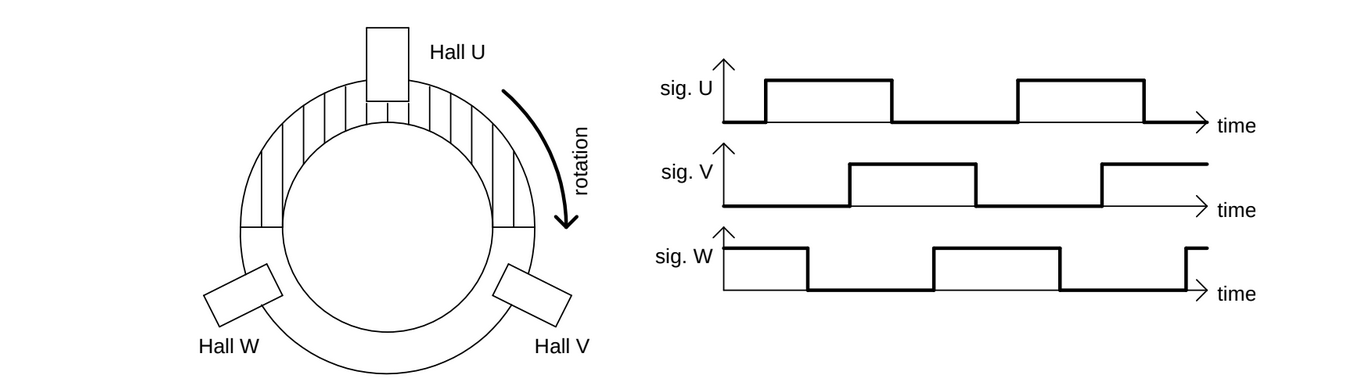
Electrical interface parameters:
- Sensor supply: 5 V, 50 mA
- Input type: with pull-up resistor (compatible with open-collector and push-pull sensor output)
- Input impedance: 1 kOhm
Recommended Hall switches: Infineon TLE4946-L2 or similar bipolar Hall switches

UVW Hall sensor connection
| Pin | Name | Function |
|---|---|---|
| 11 | HALLGND | Sensor ground |
| 15 | HALL+5V | Sensor +5 V supply |
| 13 | HALLU | Hall U digital input |
| 14 | HALLV | Hall V digital input |
| 12 | HALLW | Hall W digital input |
Resolver with one excitation winding and two sense windings (sine and cosine), electrically perpendicular to each other.
With this motor sensor variant, you will have no GPIO inputs to the controller, because GPIO0 and GPIO1 are used for resolver signals.
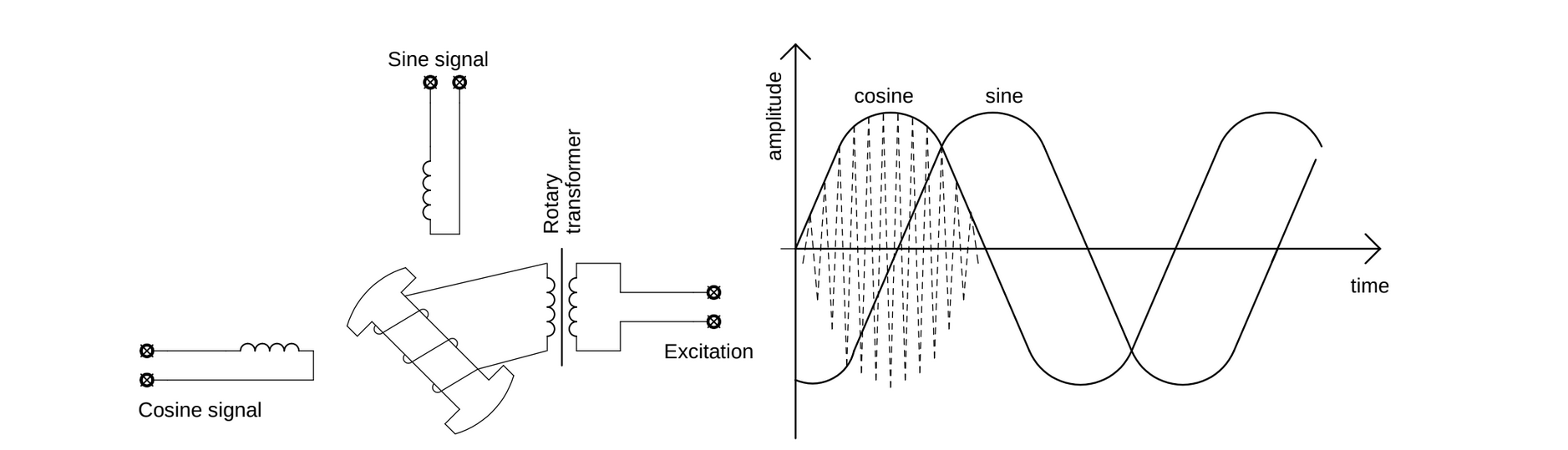
Electrical interface parameters:
- Excitation voltage (amplitude): 3.3 V
- Excitation frequency: 10 kHz
- Sense input measurement range: +/- 3.3 V (DC offset is not acceptable)
- Maximum resolver transformation ratio: 1
- Input impedance: 4.7 kOhm
Recommended resolvers: Tamagawa Seiki TS2610N171E64, Tamagawa Seiki TS2640N321E64

Two analog sinusoidal signals phase-shifted by a quarter period. Usually produced by a cylindrical permanent magnet on the rotor and a sensor chip on the stator.
With this motor sensor variant, you will have no GPIO inputs to the controller, because GPIO0 and GPIO1 are used for Sin-Cos signals.
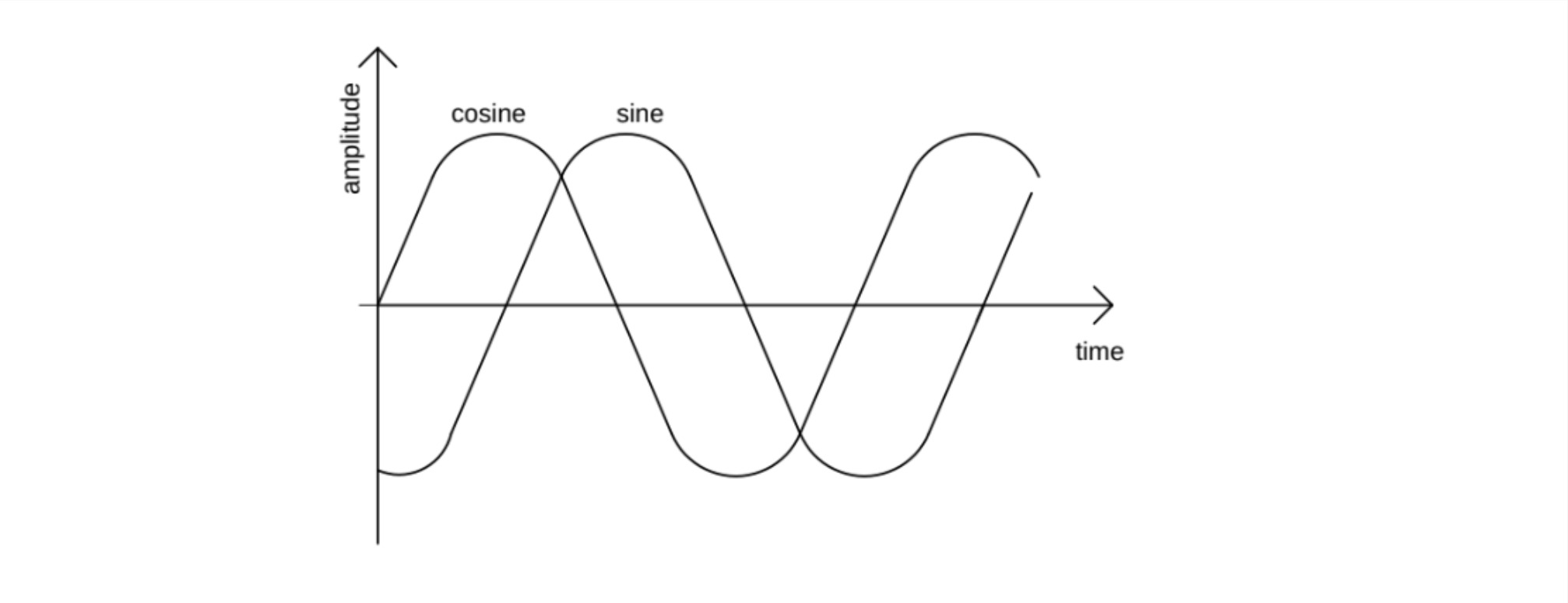
Electrical interface parameters:
- Sensor supply: 5 V, 50 mA
- Input type: single-ended or differential
- Input impedance: 1 kOhm
Recommended sensors: RLS AM512B, RLS AM256, RLS AM8192B, RLS AM4096, Infineon TLE 5012

Sin-Cos sensor connection
| Pin | Name | Function |
|---|---|---|
| 11 | HALLGND | Sensor ground |
| 15 | HALL+5V | Sensor +5 V supply |
| 20 | GPIO1 | Cos+ analog input |
| 21 | GPIO0 | Sin+ analog input |
| 14 | HALLV | Sin- / Cos- common |
Serial data interface for digital communication with rotor angle sensors. Consists of a clock line and a data line, operable in single-ended or differential mode.
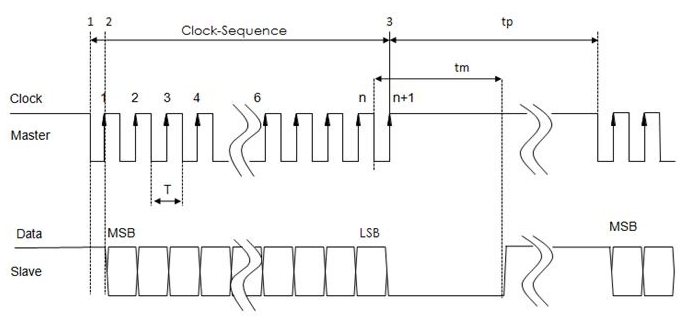
Electrical interface parameters:
- Sensor supply: 5 V, 50 mA
- Digital I/O type: single-ended or differential
- Digital I/O levels: 0 V / 3.3 V (5 V tolerant)
- Clock frequency: up to 10 MHz
- Input impedance: 4.7 kOhm
- Supported protocols: SSI, BiSS, SPI
Recommended sensors: Zettlex InCoder series, Renishaw RESOLUTE series, RLS AM8192B, RLS AM4096, Infineon TLE 5012, Allegro A133x


At least two digital inputs (Enc A and Enc B) producing phase-shifted pulses. An optional third input (Enc REF) provides one reference pulse per turn for absolute positioning.
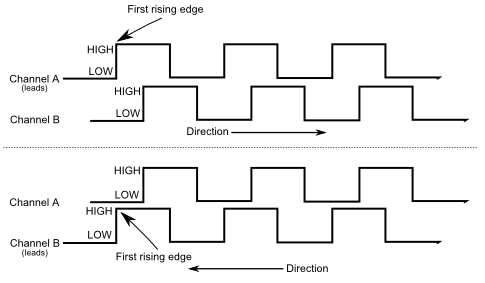
Electrical interface parameters:
- Sensor supply: 5 V, 50 mA
- Input type: with pull-up resistor (compatible with open-collector and push-pull)
- Input impedance: 1 kOhm

Motor sensor pin specification
| Pin | Name | Description | Direction | Parameters |
|---|---|---|---|---|
| 11 | HALLGND | Hall sensors supply ground, connected to BATT- | Power output | 0 V, max 50 mA |
| 15 | HALL+5V | Hall sensors supply voltage | Power output | 5 V, max 50 mA |
| 12 | HALLW | Hall W / Clock / Excitation / Enc REF | I/O | 0 -- 3.3 V, 5 V tolerant |
| 13 | HALLU | Hall U / Data / Excitation / Enc B | I/O | 0 -- 3.3 V, 5 V tolerant |
| 14 | HALLV | Hall V / Clock- / Common / Enc A | I/O | 0 -- 3.3 V, 5 V tolerant |
| 20 | GPIO1 | Resolver COS / Sin-Cos COS+ | Input | 0 -- 6.6 V, max 10 mA |
| 21 | GPIO0 | Resolver SIN / Sin-Cos SIN+ | Input | 0 -- 6.6 V, max 10 mA |
Winding temperature measurement
The AM controller can measure motor winding temperature using a temperature sensor connected between pin TEMP and pin HALLGND. Various sensor types are supported (resistance-based: NTC, PTC, KTY81).

Electrical specifications:
- Maximum voltage: 3.3 V
- Short-circuit output current: 0.5 mA
- Resistance measurement range: 15 Ohm -- 10 kOhm
Recommended temperature sensors: KTY81, any NTC or PTC with suitable resistance value